
6 - Beacon API
The Beacon API provides access to live aircraft position data based on the open ADS-BI protocol. It allows you to retrieve real-time traffic for a geographic area, publish your own beacon, and look up individual aircraft by identifier or call sign.
Understanding Traffic in Beacon Responses
Traffic responses from the Beacon API can contain two distinct categories of objects. It is important to handle them differently in your application.
Live Beacons
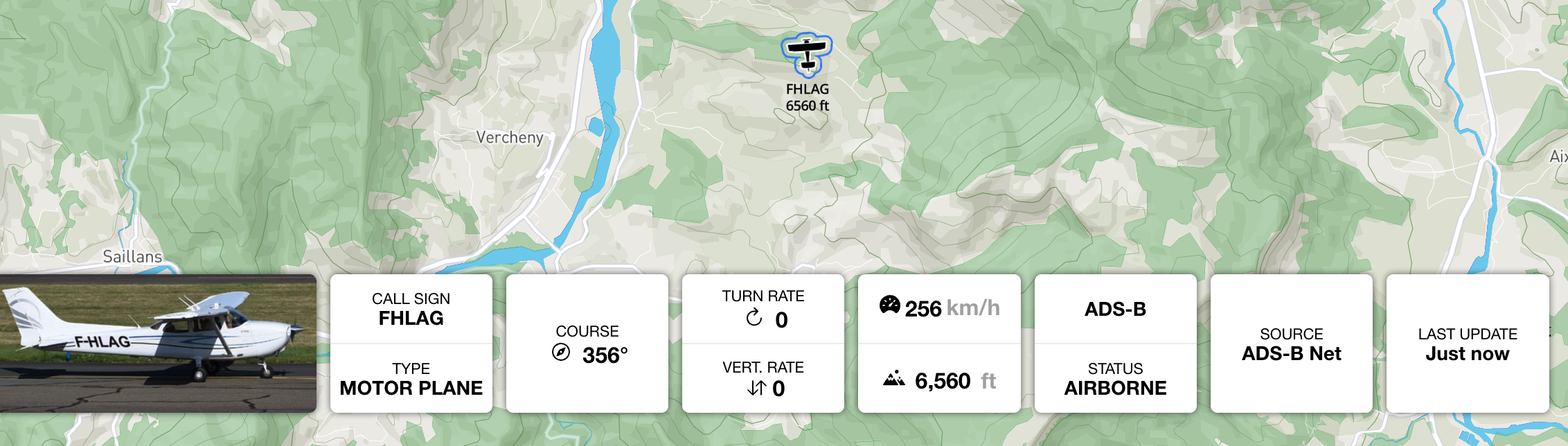
Live beacons represent aircraft that are actively broadcasting their position in real time. They are the primary traffic type and include:
- Commercial jets, general aviation, helicopters, gliders, UAVs, and other aircraft
- Positions derived from ADS-B, FLARM, ADS-L, Mode S, OGN, or the SafeSky mobile app
- Precise latitude/longitude with motion data (course, ground speed, vertical rate)
Live beacons are identified by a transponder_type value other than ADVISORY (e.g., ADS-B, FLARM, ADS-BI, OGN, MODE-S).
Advisory Beacons
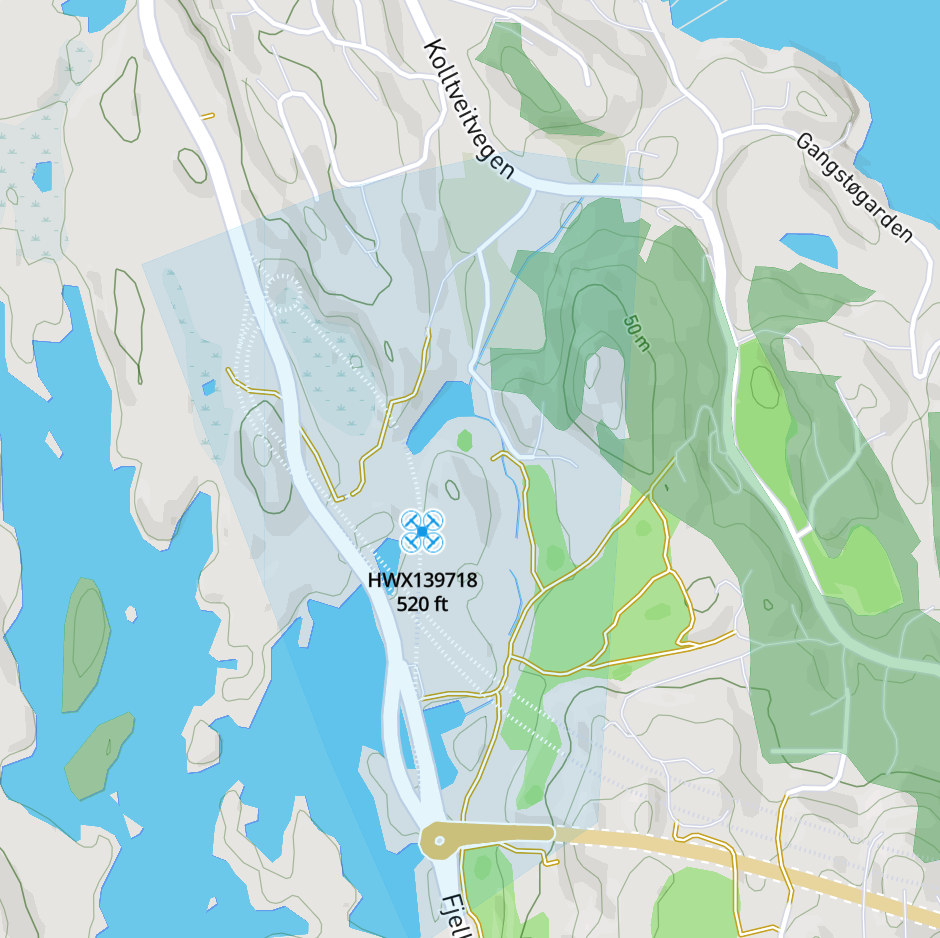
Advisory beacons represent declared UAV operation areas rather than tracked positions. They are published by drone operators to announce active operations in a geographic zone when no live telemetry is available.
An advisory beacon is identified by:
transponder_type: "ADVISORY"beacon_type: "UAV"- A populated
operation_areafield — a GeoJSON string describing the operational polygon or circle
Advisory beacons carry an operation_area field encoded as a JSON string. Parse it as GeoJSON to access the polygon or circle geometry. Key advisory properties:
| Field | Description |
|---|---|
id |
Unique identifier for the operation |
call_sign |
Operator or operation name |
altitude |
Maximum declared altitude of the operation (AMSL, meters) |
last_update |
Timestamp of the last advisory update (seconds since epoch) |
remarks |
Free-text operator notes (contact details, purpose, etc.) |
operation_area |
GeoJSON string — Polygon or Point geometry defining the operation zone |
Important: Advisory objects represent declared zones of activity, not precise tracked positions. Do not treat the
latitude/longitudeof an advisory beacon as a real-time aircraft location — it is simply a reference point for the declared area. Never render advisory traffic with a moving aircraft icon.
Handling Mixed Responses
A single API response may contain both live and advisory beacons. Always inspect the transponder_type field to determine which rendering logic to apply:
function processBeacons(beacons) {
  for (const beacon of beacons) {
    if (beacon.transponder_type === 'ADVISORY') {
      renderAdvisoryZone(beacon);   // Render as a polygon/circle area overlay
    } else {
      renderLiveTraffic(beacon);    // Render as a moving aircraft icon
    }
  }
}

function renderAdvisoryZone(advisory) {
  // Parse the operation_area GeoJSON string
  const geoJson = JSON.parse(advisory.operation_area);
  // Render as a semi-transparent polygon or circle on the map
  // Display call_sign, altitude, and remarks as a label
}
Endpoints Overview
| Method | Endpoint | Description |
|---|---|---|
GET |
/v1/beacons |
Retrieve live beacons for a viewport |
POST |
/v1/beacons |
Publish a single beacon |
POST |
/v1/beacons/batch |
Publish multiple beacons |
GET |
/v1/beacons/{id} |
Retrieve a single beacon by its ID |
GET |
/v1/beacons/search |
Search beacons by call sign or aircraft ID |
1. Get Beacons for a Viewport
Endpoint: GET /v1/beacons
Description:
Returns a collection of live beacons for the given viewport rectangle. This is the primary endpoint for displaying traffic on a map.
The viewport parameter defines a geographic bounding box from the south-west corner to the north-east corner: lat_min,lng_min,lat_max,lng_max.
Request Headers
| Header | Required | Description |
|---|---|---|
x-api-key |
Yes | Your SafeSky API key |
Query Parameters
| Parameter | Type | Required | Default | Description |
|---|---|---|---|---|
viewport |
string |
Yes | — | Bounding box: lat_min,lng_min,lat_max,lng_max. 4 decimal places is sufficient. |
show_grounded |
boolean |
No | true |
Include beacons with GROUNDED status. |
beacon_types |
string |
No | — | Comma-separated list of beacon types to filter on (e.g., HELICOPTER,UAV). |
altitude_min |
int |
No | 0 |
Filter out all beacons below this altitude (AMSL meters). 0 means unused. |
altitude_max |
int |
No | 0 |
Filter out all beacons above this altitude (AMSL meters). 0 means unused. |
identifiers |
string |
No | — | Comma-separated list of beacon identifiers to filter on. |
optimisedbooleanfalseExample Request
curl 'https://public-api.safesky.app/v1/beacons?viewport=43.1035,-2.0821,47.9943,15.3216' \
  --header 'x-api-key: <your_api_key>'
Example Request with Filters
# Retrieve only helicopters and UAVs between 0 and 500 meters
curl 'https://public-api.safesky.app/v1/beacons?viewport=50.5,4.2,50.9,4.8&beacon_types=HELICOPTER,UAV&altitude_max=500' \
  --header 'x-api-key: <your_api_key>'
Response
200 OK — Returns an array of Beacon objects (see Model Definition).
The array may contain a mix of live beacons and advisory beacons. Use the transponder_type field to distinguish them (see Understanding Traffic in Beacon Responses).
Example Response — Live Beacons Only
[
  {
    "id": "3423C3",
    "latitude": 48.86584,
    "longitude": 2.63723,
    "beacon_type": "JET",
    "call_sign": "IBE06CK",
    "transponder_type": "ADS-B",
    "last_update": 1733412793,
    "altitude": 10554,
    "course": 205,
    "ground_speed": 237,
    "vertical_rate": 2,
    "accuracy": 0,
    "altitude_accuracy": 0,
    "turn_rate": 0.0,
    "status": "AIRBORNE"
  },
  {
    "id": "F1A9E2",
    "latitude": 44.83278,
    "longitude": 6.21543,
    "beacon_type": "GLIDER",
    "transponder_type": "FLARM",
    "last_update": 1733412790,
    "altitude": 2100,
    "course": 185,
    "ground_speed": 32,
    "vertical_rate": 2,
    "accuracy": 3,
    "status": "AIRBORNE"
  }
]
Example Response — Mixed (Live + Advisory)
The following example shows a realistic mixed response containing a commercial jet (live, ADS-B), a helicopter (live, ADS-BI), and a UAV advisory zone published by a drone operator:
[
  {
    "id": "3423C3",
    "latitude": 48.86584,
    "longitude": 2.63723,
    "beacon_type": "JET",
    "call_sign": "IBE06CK",
    "transponder_type": "ADS-B",
    "last_update": 1733412793,
    "altitude": 10554,
    "course": 205,
    "ground_speed": 237,
    "vertical_rate": 2,
    "accuracy": 0,
    "altitude_accuracy": 0,
    "turn_rate": 0.0,
    "status": "AIRBORNE"
  },
  {
    "id": "096E2863",
    "latitude": 50.17081,
    "longitude": 4.52680,
    "beacon_type": "HELICOPTER",
    "call_sign": "ROTORWING 30",
    "transponder_type": "ADS-BI",
    "last_update": 1733412790,
    "altitude": 450,
    "altitude_accuracy": 10,
    "course": 315,
    "ground_speed": 54,
    "vertical_rate": 45,
    "accuracy": 0,
    "status": "AIRBORNE"
  },
  {
    "id": "hx-137105",
    "latitude": 50.69378,
    "longitude": 4.39201,
    "beacon_type": "UAV",
    "call_sign": "InspectionDrone-Alpha",
    "transponder_type": "ADVISORY",
    "last_update": 1733412780,
    "altitude": 120,
    "course": 0,
    "ground_speed": 0,
    "remarks": "Powerline inspection – contact: operator@example.com",
    "operation_area": "{\"type\":\"Polygon\",\"coordinates\":[[[4.39201,50.69378],[4.39300,50.69400],[4.39400,50.69500],[4.39201,50.69378]]]}",
    "status": "AIRBORNE"
  }
]
Key observations from the mixed response:
- The jet (
3423C3) and helicopter (096E2863) are live tracked aircraft — render them as moving icons rotated to theircourse. - The UAV (
hx-137105) hastransponder_type: "ADVISORY"— it is not a tracked position. Parse theoperation_areaGeoJSON string and render it as a semi-transparent polygon overlay on the map. Thealtitudefield holds the maximum declared altitude for the operation zone. remarksmay contain free-text operator contact details or operational notes — display these on user interaction (tap/hover).
Optimised Format
When optimised=true, each beacon is returned as a compact JSON array instead of a named-field object. This reduces payload size significantly for high-traffic viewports:
curl 'https://public-api.safesky.app/v1/beacons?viewport=43.1035,-2.0821,47.9943,15.3216&optimised=true' \
  --header 'x-api-key: <your_api_key>'
The element order in the optimised array follows the field sequence defined in the Beacon model. Use the verbose format during development for clarity, and switch to optimised=true in production for bandwidth efficiency.
2. Publish a Single Beacon
Endpoint: POST /v1/beacons
Description:
Publishes a new beacon position to the SafeSky network. Optionally returns nearby traffic by providing a viewport or filter parameters.
Request Headers
| Header | Required | Description |
|---|---|---|
x-api-key |
Yes | Your SafeSky API key |
Content-Type |
Yes | application/json |
Query Parameters
| Parameter | Type | Required | Default | Description |
|---|---|---|---|---|
viewport |
string |
No | — | If provided, returns beacons visible in this bounding box alongside the publish confirmation. |
show_grounded |
boolean |
No | false |
Include grounded beacons in the response. |
aircraft_types |
string |
No | — | Comma-separated list of beacon types to filter the response. |
altitude_delta |
int |
No | — | Altitude delta filter applied to the response. |
Request Body
A single Beacon object. See Model Definition for the full field reference.
Required fields: id, latitude, longitude, altitude, course, ground_speed.
Example Request
curl --request POST 'https://public-api.safesky.app/v1/beacons' \
  --header 'x-api-key: <your_api_key>' \
  --header 'Content-Type: application/json' \
  --data '{
    "id": "MY_BEACON_01",
    "latitude": 50.6938,
    "longitude": 4.3922,
    "altitude": 350,
    "course": 90,
    "ground_speed": 45,
    "status": "AIRBORNE",
    "beacon_type": "MOTORPLANE",
    "last_update": 1733412793
  }'
Response
200 OK — Returns an array of nearby beacons if a viewport was provided, otherwise an empty array.
3. Publish Multiple Beacons (Batch)
Endpoint: POST /v1/beacons/batch
Description:
Publishes multiple beacon positions in a single request. Use this endpoint when managing multiple aircraft or when aggregating positions from several sources to minimise HTTP overhead.
Request Headers
| Header | Required | Description |
|---|---|---|
x-api-key |
Yes | Your SafeSky API key |
Content-Type |
Yes | application/json |
Request Body
An array of Beacon objects. See Model Definition for the full field reference.
Example Request
curl --request POST 'https://public-api.safesky.app/v1/beacons/batch' \
  --header 'x-api-key: <your_api_key>' \
  --header 'Content-Type: application/json' \
  --data '[
    {
      "id": "BEACON_01",
      "latitude": 50.6938,
      "longitude": 4.3922,
      "altitude": 350,
      "course": 90,
      "ground_speed": 45,
      "status": "AIRBORNE",
      "beacon_type": "MOTORPLANE",
      "last_update": 1733412793
    },
    {
      "id": "BEACON_02",
      "latitude": 50.7010,
      "longitude": 4.4100,
      "altitude": 280,
      "course": 120,
      "ground_speed": 38,
      "status": "AIRBORNE",
      "beacon_type": "HELICOPTER",
      "last_update": 1733412793
    }
  ]'
Response
200 OK — Confirmation that the beacons were accepted.
4. Get a Beacon by ID
Endpoint: GET /v1/beacons/{id}
Description:
Returns the current live data for a specific beacon identified by its unique ID.
Request Headers
| Header | Required | Description |
|---|---|---|
x-api-key |
Yes | Your SafeSky API key |
Path Parameters
| Parameter | Type | Required | Description |
|---|---|---|---|
id |
string |
Yes | The unique identifier of the beacon (e.g., ICAO 24-bit hex address or SafeSky internal ID). |
Example Request
curl 'https://public-api.safesky.app/v1/beacons/3423C3' \
  --header 'x-api-key: <your_api_key>'
Response
200 OK — Returns a single Beacon object (see Model Definition).
Example Response
{
  "id": "3423C3",
  "latitude": 48.86584,
  "longitude": 2.63723,
  "beacon_type": "JET",
  "call_sign": "IBE06CK",
  "transponder_type": "ADS-B",
  "last_update": 1733412793,
  "altitude": 10554,
  "course": 205,
  "ground_speed": 237,
  "vertical_rate": 2,
  "accuracy": 0,
  "altitude_accuracy": 0,
  "turn_rate": 0.0,
  "status": "AIRBORNE"
}
5. Search Beacons
Endpoint: GET /v1/beacons/search
Description:
Search for a beacon by call sign or aircraft ID. Useful for finding a specific aircraft when you know its identifier or call sign but not its current geographic location.
Request Headers
| Header | Required | Description |
|---|---|---|
x-api-key |
Yes | Your SafeSky API key |
Query Parameters
| Parameter | Type | Required | Description |
|---|---|---|---|
call_sign |
string |
No | The call sign to search for (e.g., IBE06CK). |
aircraft_id |
string |
No | The aircraft identifier to search for. |
At least one of call_sign or aircraft_id must be provided.
Example Request — Search by Call Sign
curl 'https://public-api.safesky.app/v1/beacons/search?call_sign=IBE06CK' \
  --header 'x-api-key: <your_api_key>'
Example Request — Search by Aircraft ID
curl 'https://public-api.safesky.app/v1/beacons/search?aircraft_id=3423C3' \
  --header 'x-api-key: <your_api_key>'
Response
200 OK — Returns a Beacon object if found (see Model Definition).
Beacon Types Reference
The beacon_type field indicates the category of the aircraft. The following values are supported:
| Value | Description |
|---|---|
UNKNOWN |
Unknown aircraft type |
GLIDER |
Glider / sailplane |
PARA_GLIDER |
Paraglider |
HAND_GLIDER |
Hang glider |
HELICOPTER |
Helicopter |
UAV |
Unmanned Aerial Vehicle (drone) |
PARACHUTE |
Parachutist / skydiver |
MOTORPLANE |
General aviation motorised aircraft |
JET |
Commercial jet / heavy aircraft |
AIRSHIP |
Airship / blimp |
BALLOON |
Balloon |
GYROCOPTER |
Gyrocopter / autogyro |
FLEX_WING_TRIKES |
Flex-wing trike / microlight |
PARA_MOTOR |
Paramotor |
THREE_AXES_LIGHT_PLANE |
3-axis ultralight / light sport aircraft |
PAV |
Personal Air Vehicle |
MILITARY |
Military aircraft |
STATIC_OBJECT |
Static object (e.g., obstacle) |
Transponder Types Reference
The transponder_type field indicates the technology used to broadcast the position, or for advisory objects, identifies them as declared operation zones:
| Value | Description |
|---|---|
ADS-BI |
SafeSky ADS-BI (smartphone-based) |
ADS-B |
Standard ADS-B transponder |
FLARM |
FLARM collision avoidance system |
OGN |
Open Glider Network |
MODE-S |
Mode S transponder (secondary surveillance radar) |
ADVISORY |
Declared UAV operation area. The beacon is not a tracked position — parse the operation_area GeoJSON field to render the operational zone. |