
2 - Device enrollment
The
Using the SafeSky App with Your Aero-Tracker
The SafeSky App is your mainprimary applictionapplication tofor setupsetting up and managemanaging your aeroAERO tracker.TRACKER.
YouWith willit, beyou ablecan:
Alternatively, you can use your favoritefavourite navigationavigation software, software—such as SkyDemon,SkyDemon, Air Navigation Pro,Pro, EasyVFR,EasyVFR, ForeFlight, or SDVFR. for instance. ThisThese will adddisplay a traffic layer with aircraftsnearby aircraft.
Requirements
- Ensure
You mustyou have the latest SafeSky App installed from the Apple App Store ortheGoogle Playstore. - Your
set up.YouSafeSky account musthavebeconfigured your accountconfigured, withthe SafeSky App, and have configuredat least one aircraft You
need tomust subscribe to the Premium Datasubsriptionplan, whichcontainsincludes:theactivation- Activation and provisioning of mobile traffic data
Bluetooth and Wi-Fi
The ArtoAERO TrackerTRACKER can operate usingvia Bluetooth or Wi-Fi.
When using with SkyDemon or the SafeSky App,App, bluetoothBluetooth will beis used.
thatNote:
youYoudon'tdohavenot need to manually pair the tracker with yourphonephone.with the tracker. ThisPairing is handled directlyhandled fromwithin the SafeSky App.
When usedusing with other navigation software,software, the device uses GDL90 over WifiWi-Fi.
be used.Please refer to
the user manual ofyour navigationsoftwaresoftware’stomanual for GDL90 setupGDL90.instructions.
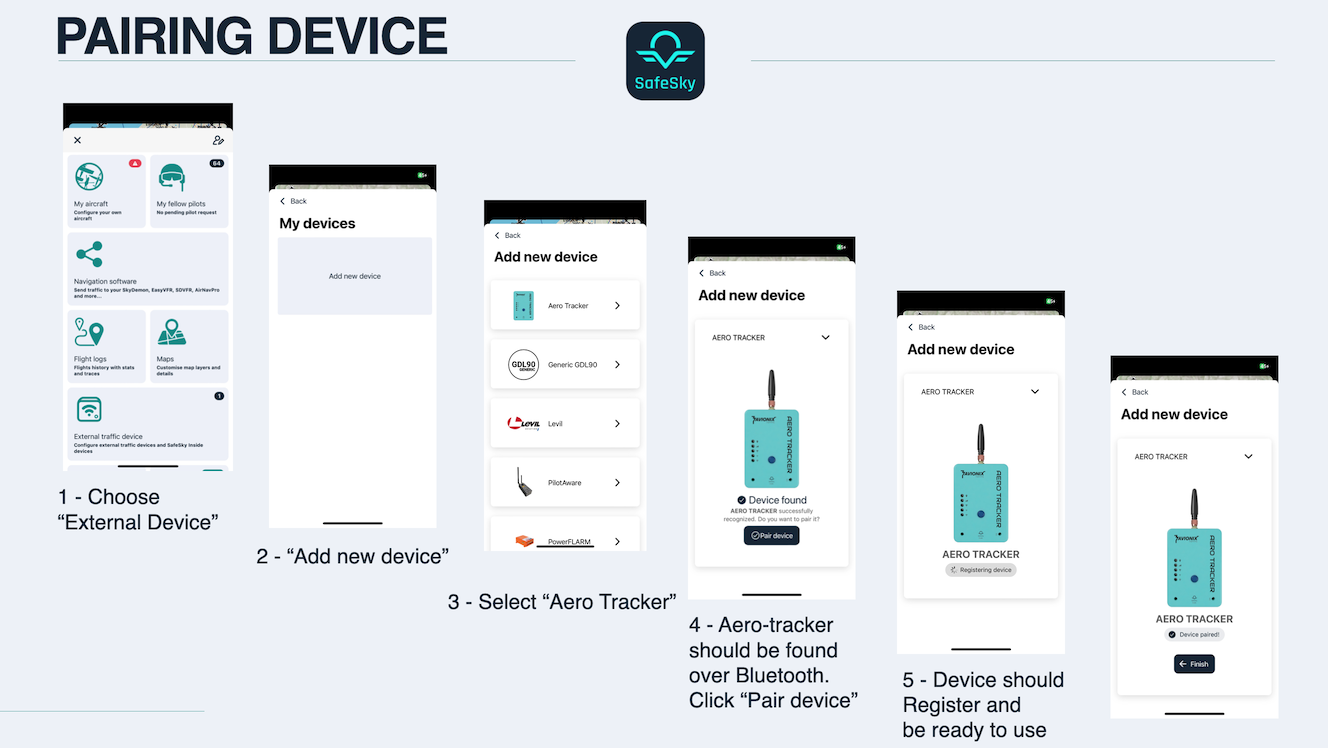
Pairing the Aero-Tracker
AERO TRACKER
Before using the aero-tracker,flying, you must pair ityour AERO TRACKER with your SafeSky account account..
EnsureMakethat there issure at least one aircraft is configured in the SafeSky App.- Follow the on-screen instructions to complete the
pairing.pairing process.
SIM Card information
Information
- The AERO
TrackerTRACKERis shipping withincludes a built-in SIM card. TheItSIMsupportscardmobilewilldatawork foracross the following countries:
- The AERO
| Country | Country |
|---|---|
| Åland Islands | Lithuania |
| Austria | Luxembourg |
| Belgium | Malta |
| Bulgaria | Mayotte |
| Croatia | Netherlands |
| Cyprus | Norway |
| Czech Republic | Poland |
| Denmark | Portugal |
| Estonia | Réunion |
| Finland | Romania |
| France | Serbia |
| Germany | Slovakia |
| Greece | Slovenia |
| Guernsey | Spain |
| Hungary | Svalbard and Jan Mayen |
| Iceland | Sweden |
| Ireland | Turkish Republic |
| Isle of Man | United Kingdom |
| Italy | Vatican City |
| Jersey | Liechtenstein |
| Latvia |
Note :Note: Switzerland will be availablesoonsoon.
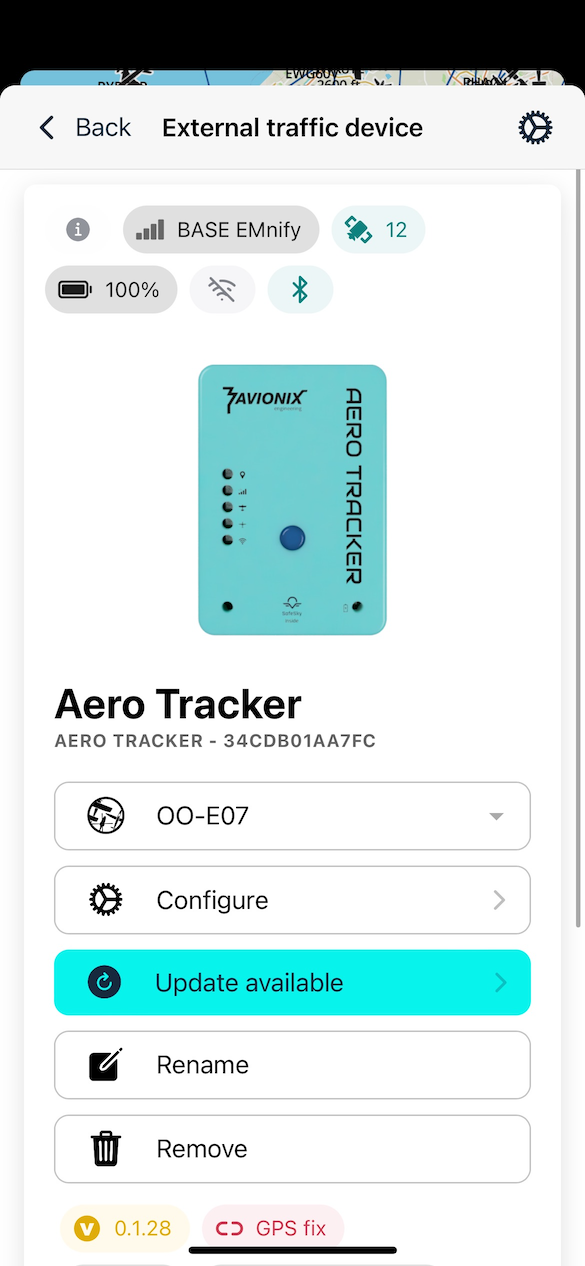
Status Information
When you return to "External Devices", youin shouldthe SafeSky App, you’ll see diagnostic information,data including:such as:
- LTE connectivity
- Location and altitude (
viarequiresinternetaGPSclear—viewensureofyoutheare outdoorssky for GPSto function properly)

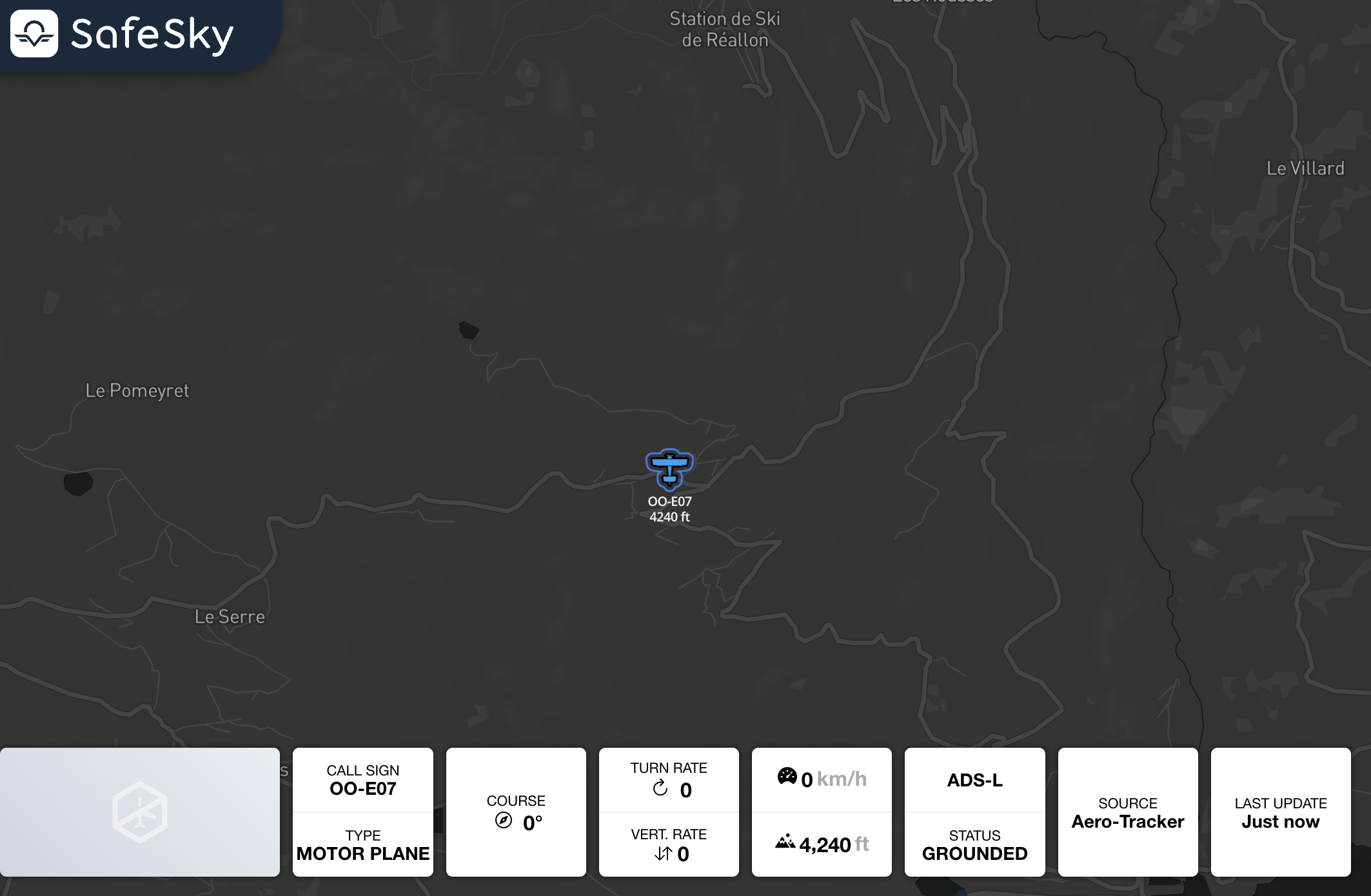
You should also see your aircraft displayed inlive on the SafeSky fromweb map:
➡️ https://live.safesky.app:
With these steps completed, your aero-trackerAERO TRACKER shouldis benow fully operational and seamlessly integrated with SafeSky!. 🚀